
Roblox Shirt Template
Download a free Roblox shirt template as a 585×559 PNG — a labeled guide, a transparent outline, a blank white version and a shading overlay. Draw your design on it in any image editor, then load the finished PNG into the 3D preview to check that every part lands where you expect before you spend Robux on the upload.
Download the Roblox Shirt Template
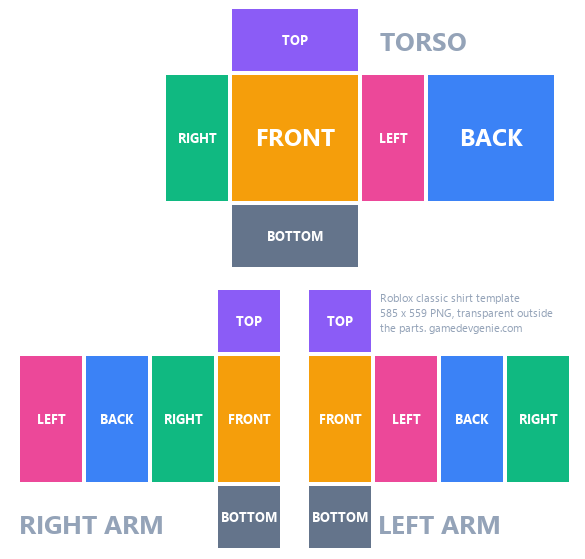
Every part coloured and named — use it as a reference layer while you draw.
Preview Your Shirt on a 3D Avatar
Load your finished 585×559 PNG to see it on a blocky avatar, and drag to check the back and sides.
Loading 3D preview…
PNG or JPG — the image stays in your browser. Drag to turn the avatar.
Roblox Shirt Template Size
A Roblox shirt template is a 585×559 pixel image. Roblox cuts it into the faces of the torso and both arms and folds them around the avatar. The torso front and back are 128×128 pixels, the torso sides 64×128, and the top and bottom of the torso 128×64. Each arm has four 64×128 sides and a 64×64 top and bottom.
Anything outside those rectangles is ignored, so it does not matter what is there. Save your shirt as a PNG to keep transparent areas transparent — Roblox also accepts JPG, but JPG has no transparency.
Which Part Is Which
The torso row reads RIGHT, FRONT, LEFT, BACK: it wraps around the body, starting at the avatar’s right side. The TOP sits above the front and the BOTTOM below it.
The arms work the same way. The right arm is the block at the bottom left of the template and the left arm the block at the bottom right; each arm’s FRONT is the face next to its TOP and BOTTOM squares. Right and left are the avatar’s, so the right arm appears on your left when the avatar faces you.
Transparent Shirt Template
The transparent template has only thin outlines, so you can keep it on its own layer while you draw and hide it before you export. Parts you leave transparent show the avatar’s skin or the pants underneath — that is how crop tops, sleeveless shirts and ripped sleeves are made.
Roblox Shading Template
The shading template adds soft shadows at the edges, folds under the arms and a crease at each elbow. Put it on a layer above your design, set the layer to Multiply or lower its opacity, and the shirt looks less flat on the avatar. It is a black-and-transparent PNG, so it works over any colour.
How to Make a Shirt on Roblox
Download the template and open it in an editor with layers, such as Photopea, GIMP, Krita or Photoshop. Paint each part, keep the design inside the rectangles, and export a 585×559 PNG.
Test it for free: load the PNG into the 3D preview on this page, or in Roblox Studio insert a Shirt into a block avatar rig and set its ShirtTemplate to your image.
To sell it, open Avatar Items → Classics in the Creator Dashboard, click Upload Asset, set the asset type to Shirt, add a name and description and upload — the upload fee is 80 Robux. Then open the item, switch On Sale on and set a price; putting it on sale takes a 10 Robux publishing advance. Uploading and selling clothing needs ID verification or a linked parent account.
What a Roblox Shirt Earns
In the Marketplace, the creator’s share starts at 30% when the shirt is priced at the price floor and rises with the price, up to 70% at six times the floor or more. When the shirt is sold inside an experience, the creator gets 30%. The Roblox Tax Calculator works out what you keep at any price.
Roblox Shirt Template FAQ
What size is the Roblox shirt template?
585×559 pixels. The torso front and back are 128×128, the torso sides 64×128, and each arm side 64×128.
Can a Roblox shirt have a transparent background?
Yes. Save it as a PNG with transparency. Anything outside the template parts is ignored, and transparent pixels inside the parts show the avatar’s skin or pants underneath.
What is the difference between a shirt and a T-shirt?
A shirt wraps the whole torso and both arms using the 585×559 template. A classic T-shirt is one square image, such as 512×512, shown on the front of the torso.
How much does it cost to upload a shirt?
80 Robux per upload, plus a 10 Robux publishing advance when you put it on sale, which is paid back as the shirt sells.
Do I need Premium to sell shirts?
Roblox’s July 2026 update requires an active Plus or Premium subscription to keep avatar items on sale, as well as ID verification or a linked parent account. Check the Creator Dashboard for the current requirements.
Is this the official Roblox template?
No. GameDevGenie drew these templates using the same layout as Roblox’s official classic clothing template, so every part lines up with it exactly.
Template layout measured from Roblox’s official classic clothing template; sizes and fees checked on October 13, 2026 against Roblox’s documentation. Classic clothing Marketplace fees and commissions
More Roblox Guides
Free Tools
- Roblox Tax Calculator See the Robux you keep after Roblox’s 30% fee, the exact game pass price for the amount you want, and your DevEx payout in USD.
- Roblox Pants Template Free 585×559 pants templates — labeled, transparent, blank and shading — with a 3D avatar preview.
- Roblox T-Shirt Template Free 512×512 transparent T-shirt template, a guide version and a shading T-shirt, with a 3D preview of your design.
More Game Asset Tools
- Roblox Thumbnail Maker AI key art for your Roblox experience, with your game title and an UPDATE or EVENT badge drawn in. Download a 1920×1080 JPG.
- Roblox Game Icon Maker Square game icons, badges and RPG item icons in one consistent style. Remove the background for free in your browser or with AI.
- Roblox UI Maker AI Roblox UI templates — menus, shops, inventories, HUD bars and buttons — with a visual 9-slice editor and ScreenGui export.
- Roblox Shirt Maker Make Roblox shirts, pants and T-shirts: pick colours, add an AI pattern or graphic, check it on a 3D avatar and download the PNG.
- Image to 3D Model Turn one image into a textured 3D model with PBR maps and a face limit you choose. Preview it in the browser, then download GLB or FBX.
- 8-Bit Music Generator Free chiptune loops made in your browser with tempo, key and stems, or full instrumental tracks composed by AI (Suno V5).
- Sound Effect Generator Free retro game sound effects made in your browser: lasers, coins, jumps, hits and UI clicks. Tweak pitch and length, download WAV.
- NPC Dialogue Generator Describe an NPC and AI writes a branching dialogue tree with choices, conditions and endings. Export Roblox Luau, Yarn Spinner or JSON.
- Game Texture Maker Generate a tileable game texture with AI or start from your own image, then download albedo, normal, roughness, metallic, AO and height maps.